IT for Medical and Dental Offices in Mississauga
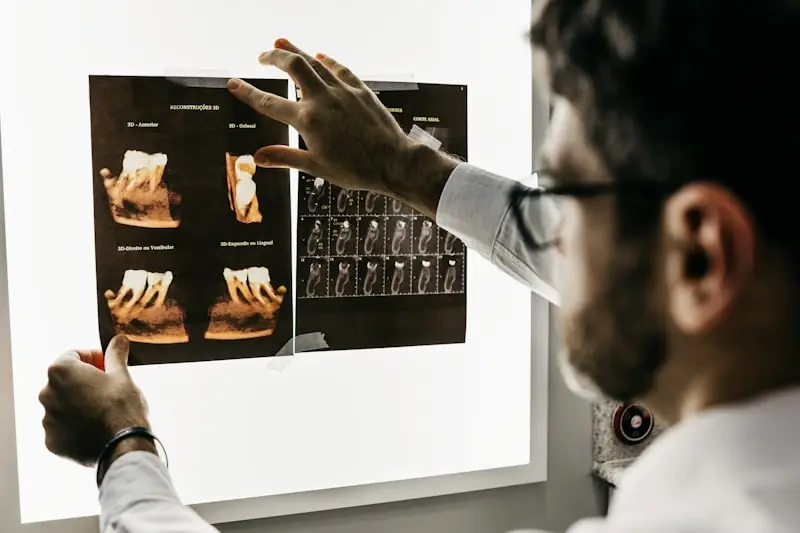
Dental IT support in Mississauga means one accountable provider for everything around your practice software: the front desk and operatory computers, the imaging sensors and the PC they plug into, the network and Wi-Fi, email, backups and security, coordinated with your EMR or practice management vendor rather than left to them. IT Rapid Support provides that for Mississauga medical and dental offices from our office at 7810 Keele St in Vaughan, remotely first and on site when the fault is physical, on an hourly basis or under a managed agreement.
Mississauga has hundreds of medical and dental practices, from single dentist offices in Streetsville plazas to multi physician clinics along Hurontario and the specialist suites around Credit Valley and Trillium. Almost all of them run on the same fragile arrangement: an EMR or practice management system supported by its vendor, a network set up by whoever installed the internet, a backup nobody has tested and a receptionist who is also the unofficial IT department. That arrangement works until the morning the schedule will not load or a phishing email lands in the right inbox. This guide explains what PHIPA actually expects of a practice's technology, where the common gaps are, and what a properly managed setup looks like.
What PHIPA expects of your IT
Under Ontario's Personal Health Information Protection Act, a physician, dentist or clinic is a health information custodian, and the custodian, not the software vendor, is responsible for safeguarding patient records. The Information and Privacy Commissioner of Ontario's guidance on reporting a health privacy breach, current as of September 2026, says custodians must notify the IPC at the first reasonable opportunity when a breach falls into any of seven categories set out in the regulation. Stolen information is one of them, and the IPC's page names ransomware and other malware attacks specifically as breaches that must be reported. Snooping by staff is another.
Two details in that guidance should shape your IT decisions. First, the IPC says you do not need to notify it when stolen information was encrypted. Full disk encryption on every laptop and every server is therefore not a nicety; it is the difference between a lost laptop and a reportable breach. Second, the duty to notify the IPC is separate from the duty under subsection 12(2) of PHIPA to notify the patients themselves. Even a breach that does not need to go to the Commissioner can still mean letters to patients.
Your EMR vendor is not your IT department
Cloud based EMR and practice management platforms have removed the server from many offices, and that is good. It has also created a blind spot. The vendor supports their application. They do not manage your firewall, your Wi-Fi, the workstations that log into their system, the imaging sensors and the computer they plug into, your email, your phones or your backups of anything outside their platform. When a workstation is infected and the vendor says it is a local problem, they are right, and someone has to own it.
The same applies to offices with an on premises server. The vendor will help you upgrade their database. They will not tell you the server's operating system reached end of life two years ago or that its backup job has been failing since March. Ask your vendor in writing what they cover, then hand everything else to one accountable IT provider. Our dental office IT guide for Ontario walks through that division of responsibility in more detail.
Backups that survive ransomware
A backup that sits on a drive plugged into the server is encrypted along with the server when ransomware runs. A backup that only the EMR vendor holds does not include your documents, scanned referrals, imaging, email or accounting. The Canadian Centre for Cyber Security's baseline controls for small and medium organizations list backing up and encrypting data as one of thirteen fundamentals, and the useful test is a restore, performed on a schedule, timed, and documented. If nobody can tell you how long it would take to get the office working again after a total loss, you do not have a backup plan. You have a hope.
MFA and phishing
Statistics Canada's survey of cyber security incidents in 2023, released October 21, 2024, found scams and fraud were the most common method used against Canadian businesses, involved in half of the incidents businesses reported. In a medical office that usually means a convincing email: a fake invoice from a supply company, a message pretending to be the EMR vendor asking staff to sign in again, or a spoofed note from the practice owner asking for a gift card purchase. Multifactor authentication on email, on the EMR and on any remote access blocks the majority of these even when someone clicks. Pair it with email filtering that quarantines lookalike domains and a short annual training session for the front desk, who see more of these messages than anyone. Our guide on stopping phishing attacks covers the mechanics.
Keep patient Wi-Fi off the clinical network
Free Wi-Fi in the waiting room is expected. It should never share a network with the workstations, the imaging equipment, the printers or the phone system. A patient's infected phone, or a visitor who is not a patient at all, should be able to reach the internet and nothing else. The Cyber Centre's baseline includes securely configuring devices and establishing basic perimeter defences, and in a clinic the practical version is a guest network on its own VLAN with a firewall rule that denies it access to anything internal. While you are there, change the router administrator password from whatever was on the sticker and disable remote management unless someone you trust is managing it.
Devices, staff and departures
Every workstation, laptop and tablet that touches patient data should be inventoried, encrypted, patched automatically and locked after a few minutes of inactivity. Each staff member gets their own login, never a shared front desk account, so that access can be audited if the IPC ever asks who looked at a record. When a hygienist, associate or receptionist leaves, their accounts are disabled the same day, including the EMR, email, the imaging software and any remote access.
The first hour after something goes wrong
If a screen shows a ransom note or a staff member reports they entered their password on a strange page, the sequence is: disconnect the affected machine from the network, do not power it off, call your IT provider, and start a written timeline. Your IT provider's job is to contain the incident, determine what data was involved and whether it was encrypted, and give you the facts you need to decide whether the IPC and your patients must be notified. Having that provider already know your office is the difference between a contained afternoon and a very long week.
The medical and dental office IT checklist
- Every laptop and server has full disk encryption turned on and verified.
- You have a written list of what the EMR or PMS vendor supports and one named provider for everything else.
- Backups cover everything, are kept off the main network, and a timed restore test happens at least quarterly.
- MFA is enforced on email, the EMR, remote access and administrator accounts.
- Patient Wi-Fi runs on its own isolated network with no path to clinical systems.
- Each staff member has an individual login and departures are disabled the same day.
- Workstations patch automatically and lock after a few minutes idle.
- Staff know the first hour steps and who to call, and that number answers 24/7.
- You know which breaches must go to the IPC and which require patient notification.
Dental Computer Support: Imaging Sensors, Operatory PCs and the Front Desk
The computers in a dental office are not interchangeable. The operatory PC drives the intraoral sensor or camera, the panoramic or CBCT unit usually has its own acquisition workstation, and the front desk runs scheduling, billing and the phones. Each has its own failure mode. A Windows update that changes a USB driver can stop a sensor from being recognised, an imaging database that grows unchecked fills the disk it sits on, and a front desk PC that is also used for personal browsing is the likeliest place for malware to land.
Good dental computer support treats those machines differently: imaging workstations get updates tested and scheduled outside clinical hours, sensor and imaging software versions are recorded so a rebuild does not turn into guesswork, and the imaging data store is included in the backup with its own restore test. When the fault is inside the imaging application itself, we open the ticket with the vendor and stay on it, so the office is not caught between two support lines.
Backups for Imaging, Monitoring and Sensor Data
Imaging is the part of a practice's data that most often falls outside the backup. The EMR may be in the cloud, but radiographs, scans and intraoral photos are often stored locally on a server or a single workstation, sometimes on a drive nobody remembers. The test is simple: ask where the images from last Tuesday are stored and when that location was last restored from backup. If the answer is unclear, that is the first job.
We also monitor the things that fail quietly: disk space on the imaging store, the health of the drives in the server, backup jobs that report success while skipping open files, and the network equipment the operatories depend on. Monitoring is what lets a problem surface on a Thursday afternoon rather than at 8 a.m. with a full schedule.
EMR and Practice Software Training for Staff
Your EMR or practice management vendor trains staff on the application itself: charting, scheduling, billing. What usually gets missed is the IT side of using it safely. New staff need their own login on day one, MFA set up on their phone, a clear rule about where documents and scanned referrals are saved, and a short explanation of what a phishing email pretending to be the vendor looks like. We handle that onboarding as part of the helpdesk, and the matching offboarding when someone leaves, including the EMR, email, imaging and any remote access.
If you are changing EMR or moving from an on-premises system to a cloud platform, the vendor runs the data migration. We prepare the workstations, browsers, printers, scanners and network for the new system, check that the old server's data is backed up and retained for as long as your records obligations require, and decommission the old hardware safely once you are sure nothing else depends on it.
Opening, Expanding or Moving a Practice in Peel
A new operatory or a new location is mostly an IT project with a dental deadline. Cabling for each chair, a network with the patient Wi-Fi separated from clinical systems, workstations configured for the imaging equipment, phones, printers and the internet connection all need to be ready before the first patient, and the vendor installers need someone on site who can answer network questions. We plan that work with the contractor and vendors so the cut-over happens on a weekend rather than during clinic hours.
The same approach applies across Peel. Practices in Brampton are supported the same way as those in Mississauga, and our IT support in Brampton page covers that city. For the wider picture of how we support clinics, see our IT support for dental practices page.
IT support for Mississauga practices
IT Rapid Support has looked after medical and dental offices since 2018, and our healthcare and dental pages describe how that work is set up. For a practice in Mississauga, our managed IT services cover the workstations, network, backups and vendor coordination on one fixed monthly fee, our cybersecurity services handle the MFA, filtering, encryption and monitoring that PHIPA safeguards depend on, and our 24/7 helpdesk means a person answers when the schedule will not load at 7:45 a.m. The Mississauga IT support hub has the rest. Call (289) 582-9930 to book a no obligation review of your office.
Frequently Asked Questions
Do you provide dental IT support in Mississauga on site?
Yes. Most issues are fixed remotely in the same session, and when the fault is physical, such as a failed workstation, network equipment or cabling, a technician is dispatched from our Vaughan office at 7810 Keele St to the practice. Planned work such as new operatories or updates to imaging workstations is scheduled outside clinical hours where possible.
Do you support dental imaging sensors and the computers they connect to?
We support the computers, drivers, network and storage around your imaging equipment, and we include the imaging data in the backup and restore tests. Faults inside the imaging or practice management application itself are opened with the software vendor, and we coordinate with them until the issue is resolved.
Can you train our staff on our EMR?
Application training on charting, scheduling and billing comes from your EMR or practice management vendor. We cover the IT side: individual logins, MFA, where files are saved, how to spot phishing that impersonates the vendor, and same-day account removal when someone leaves.
How much does IT support for a Mississauga dental office cost?
Outside an agreement, IT work is billed by the hour. Practices that want monitoring, patching, backups, security and the helpdesk included can move to a managed agreement with a fixed monthly fee set by the number of users, workstations and locations. The first assessment is free.
Share this resource

IT Rapid Support Team
Managed IT & Cybersecurity, GTA
IT Rapid Support Team is a security expert with extensive experience in creating security guidelines.
More from this authorRelated Resources

LSO Technology Competence: What Ontario Law Firms Need
What LSO rule 3.1-2 technology competence requires of Ontario law firms, with a checklist by firm size, common gaps and how to document compliance.
Read more: LSO Technology Competence: What Ontario Law Firms Need
Cybersecurity Checklist for Ontario Law Firms
35 cybersecurity controls for Ontario law firms, each tied to LSO, LAWPRO, PIPEDA or cyber insurance requirements, plus a printable checklist.
Read more: Cybersecurity Checklist for Ontario Law FirmsIT for Law Firms in Mississauga: What the LSO Expects
IT for Mississauga law firms: LSO technology expectations, document management, wire fraud on closings, MFA and secure remote work, with a checklist.
Read more: IT for Law Firms in Mississauga: What the LSO ExpectsNeed Expert Security Advice?
Our team of cybersecurity experts is ready to help you secure your organization. Schedule a free consultation today.
Get in Touch